 |
|
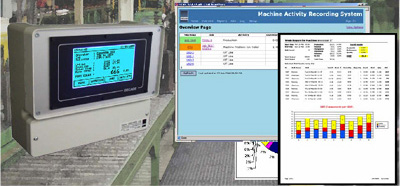
DECADE Production Recording System.
The Production Recording System has been designed to provide a flexible and
inexpensive solution to measure and record machine production activity in a manufacturing plant or cell. The system is designed to be simple to use and install and fills the gap between a ‘paper’ system and a integrated MES (Manufacturing Execution System). You can monitor just one or many machines in the factory, or just target a problem process. |
|
|
Collecting Production Activity Data.
|
Job Tracking.
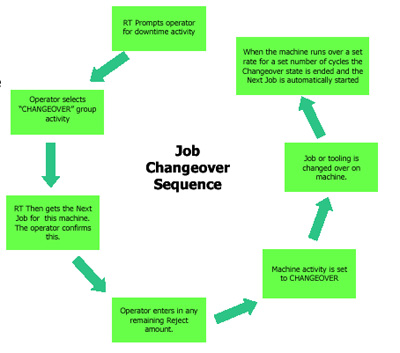
By assigning a group of downtime activities to ‘Changeover’ this can be used to start a job changeover
sequence. When the remote units requests the operator for a downtime activity they would select one from the
‘Changeover’ group. When the operator has selected the next Job the remote unit now records all time in the
current Job as Changeover time until the machine start production with the next Job. |
| Downtime Activity Reasons.
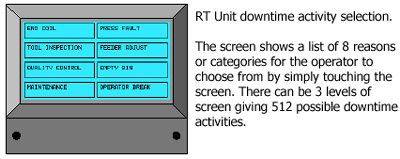
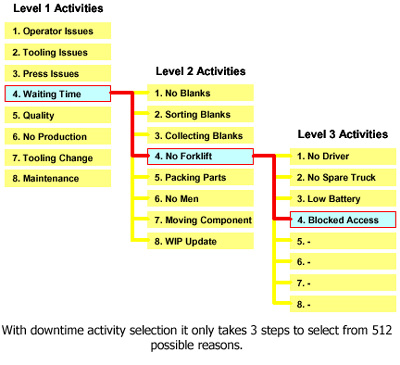
When the Remote Terminal needs a downtime activity reason from the operator it displays a choice of 8 ‘level-1’ reasons, the operator simply touches the screen at the appropriate reason. After selected a further 8 ‘level-2’ reasons can be displayed for the operator to make a second choice from. And if required a third 8 ‘level-3’ reasons can also be displayed.
|
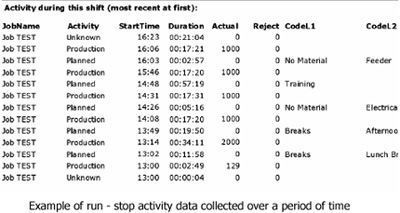
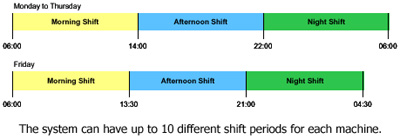
| Shift Based Recording. The Remote Terminal only monitors machine activity during working hours, and to do this a list of ‘shifts’ are held for each machine. When inside a shift period machine activity is recorded, each shift has its own database record which means you can get machine activity reports for individual shifts.
|
| Report Generation
The web application can generate a variety of views and reports using the data logged from the various remote
units on the machines. Reports are viewed on the web browser or can be produced in PDF format which can be
printed or sent via email. You can currently generate the following types of reports, but we will be adding to this list as part of the ongoing development with customers. Activity Report for a Period of Time (i.e. shifts, days, weeks, months, quarters). This report lists all the activity recorded in chronological order as a list, it also calculated the total & percentages for Production, Planned & Unplanned downtime, Changeover & No Job. 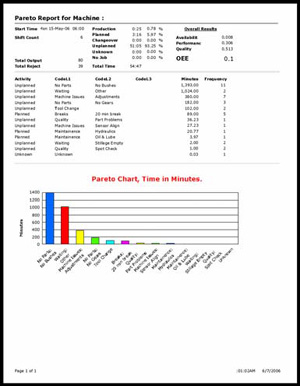 OEE Report for a Shift or Job. This report lists all the activity in chronological order, totals & percentages. It also calculates the OEE values for Availability, Performance, Quality & OEE. For shift OEE the calculation takes in account each Job that has been run during the shift and proportions each job’s OEE results to obtain the overall Shift OEE. The availability calculation also takes into account the maximum changeover time for each job, if the time is over this maximum it is then treated as unplanned downtime. 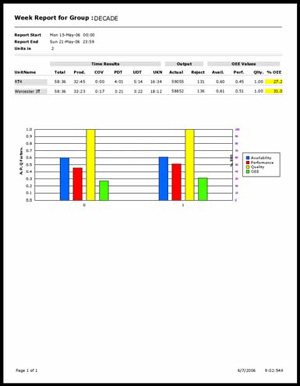 Pareto Chart of Downtime Activity. Use to identify the worst offending downtime activities over periods of time. 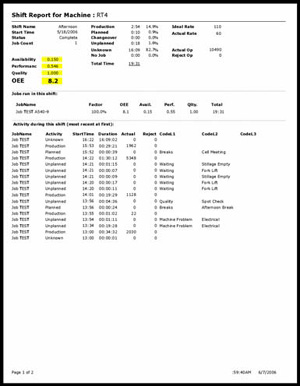 Grouped Total Reports for a Period of Time. Shows totals of activity groups recorded in time-spent order. |
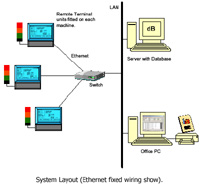
Remote Terminal Units : Requires permanent 85-265vac 50Hz supply. Requires cyclic signal from machine for run status and rate measure-ment. Volt-free contact for start-inhibit and beacon outputs. Ethernet connection 10BaseT or WiFi 802.11b, TCP/IP protocol fixed IP address.
Size 210wx180hax90d. Time and Date synchronized from Server PC. LCD display with backlight and resistive touch screen.
Server PC : Dedicated PC required to hold database (MySQL) and run server and web applications to connect to the RT/160/260 units. Min of 20 Gbyte of disk space for database storage. PC must have fixed IP address for remote units to connect to. Windows2K (SP4) / XP / Server operating system required. This computer would be running 24:7 to serve requests from remote units.
Application Software : Microsoft ASP.Net Web Application.
DECADE has a policy of continuous development of products with customers and users. Information in this sheet was current at the time of writing, however specifi-cations
may change in the future as a result of development. Document Revision 2. June 2006.